> ## Documentation Index
> Fetch the complete documentation index at: https://relate.so/docs/llms.txt
> Use this file to discover all available pages before exploring further.
# Relate Connect for Chrome Alpha
> Relate Connect for Chrome lets you extract Linkedin profile data automatically.
 ## Overview
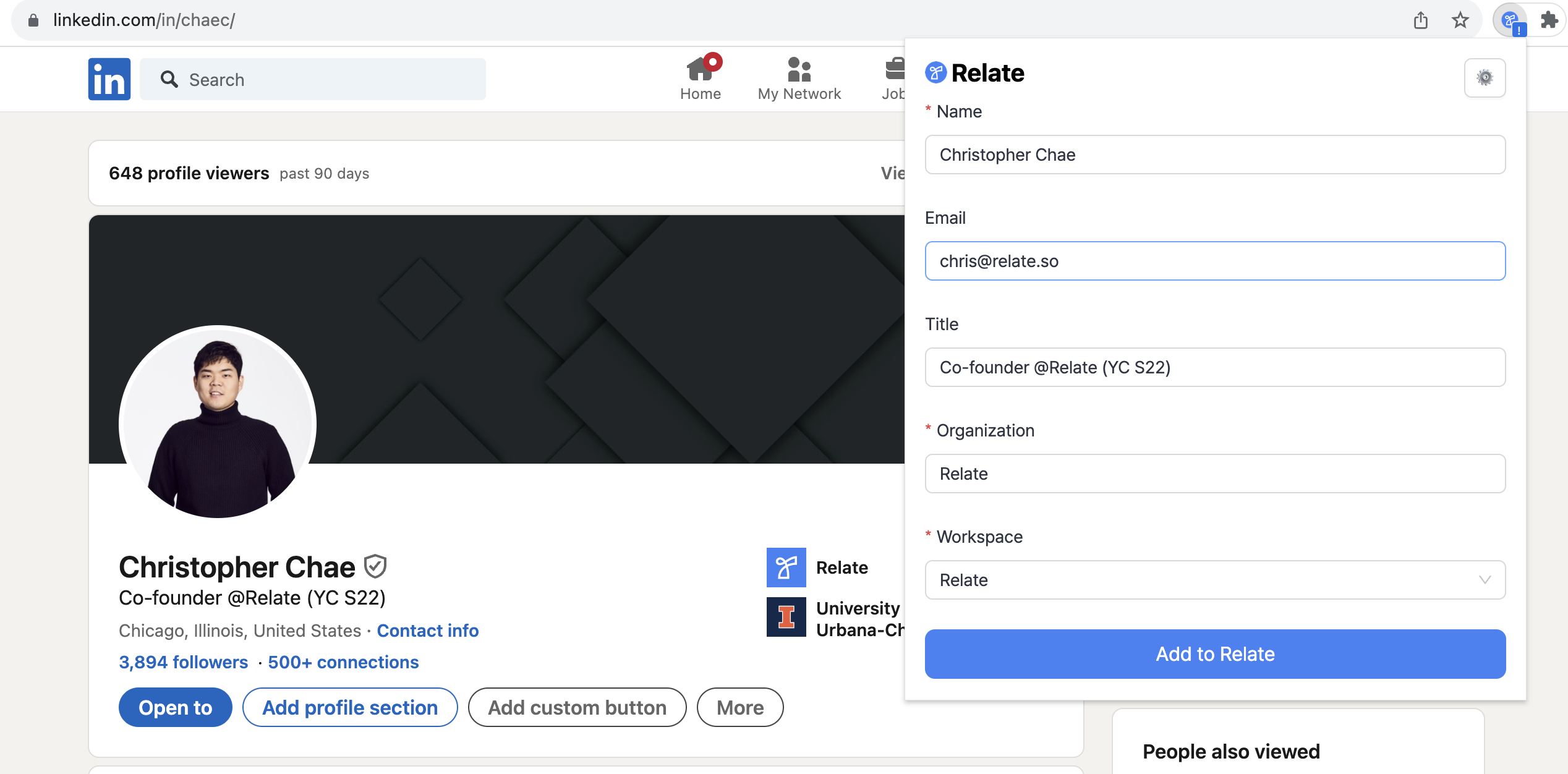
You can now use Relate Connect for Chrome to extract Linkedin profile data (e.g., name, title, company, email address, etc.) and add to Relate automatically.
## How to install
### Requirements
* We support only Google Chrome for now. We will support other Chromium-based browsers (e.g., Arc, Edge, Brave) will soon.
* We currently support macOS, Windows, and Linux OS
### Install Alpha version
[Install link](https://itero.plasmo.com/ext/ogpinifhnhlfmafbalecnmakopnldfgg)
In the link above, choose your OS and follow the instructions to install Relate Connect for Chrome.
### Log into Relate within Extension
Once you installed Relate Connect for Chrome, log into Relate within the Extension. If you're already signed into Relate, the Extension will automatically pick it up and log you in.
## Overview
You can now use Relate Connect for Chrome to extract Linkedin profile data (e.g., name, title, company, email address, etc.) and add to Relate automatically.
## How to install
### Requirements
* We support only Google Chrome for now. We will support other Chromium-based browsers (e.g., Arc, Edge, Brave) will soon.
* We currently support macOS, Windows, and Linux OS
### Install Alpha version
[Install link](https://itero.plasmo.com/ext/ogpinifhnhlfmafbalecnmakopnldfgg)
In the link above, choose your OS and follow the instructions to install Relate Connect for Chrome.
### Log into Relate within Extension
Once you installed Relate Connect for Chrome, log into Relate within the Extension. If you're already signed into Relate, the Extension will automatically pick it up and log you in.
## How it works
Go to any Linkedin profile page and click on the Relate Connect for Chrome extension button. The extension will extract any publicly available data in the profile page.
To automatically add the extracted data to Relate, choose the workspace you want to add data to, and click `Add to Relate`.
## Frequently Asked Questions (FAQ)
If the profile owner chose to hide their email address, the extension will not be able to extract the email address.
Generally, if you are a 1st degree connection with the profile owner, you'll be able to see their contact information. For 2nd or 3rd degree connections, the profile owner needs to make their contact information publicly available.